Since Anthropic released Claude Opus 4.5 in late 2025, it’s become one of the most talked-about AI models for coding, deep reasoning, and agent-based workflows. Its improvements in code generation quality, context comprehension, and efficiency have sparked major discussions among developers using tools like Visual Studio Code (VS Code) and Cursor. (Anthropic)
In this guide, we’ll break down what Opus 4.5 brings to the table and how its performance, cost, and user experience differs when used inside VS Code vs. Cursor.
🔍 What Is Claude Opus 4.5?
Claude Opus 4.5 is Anthropic’s flagship model tuned for complex coding tasks, deep reasoning, and agentic workflows. It improves upon earlier models with:
- Better long-context understanding
- Higher quality code output
- Improved efficiency (fewer tokens but higher pass rates)
- Enhanced reasoning across multi-step programming jobs
Opus 4.5 has quickly gained traction not just among AI enthusiasts but among professional developers aiming for faster build cycles and smarter refactors. (Anthropic)
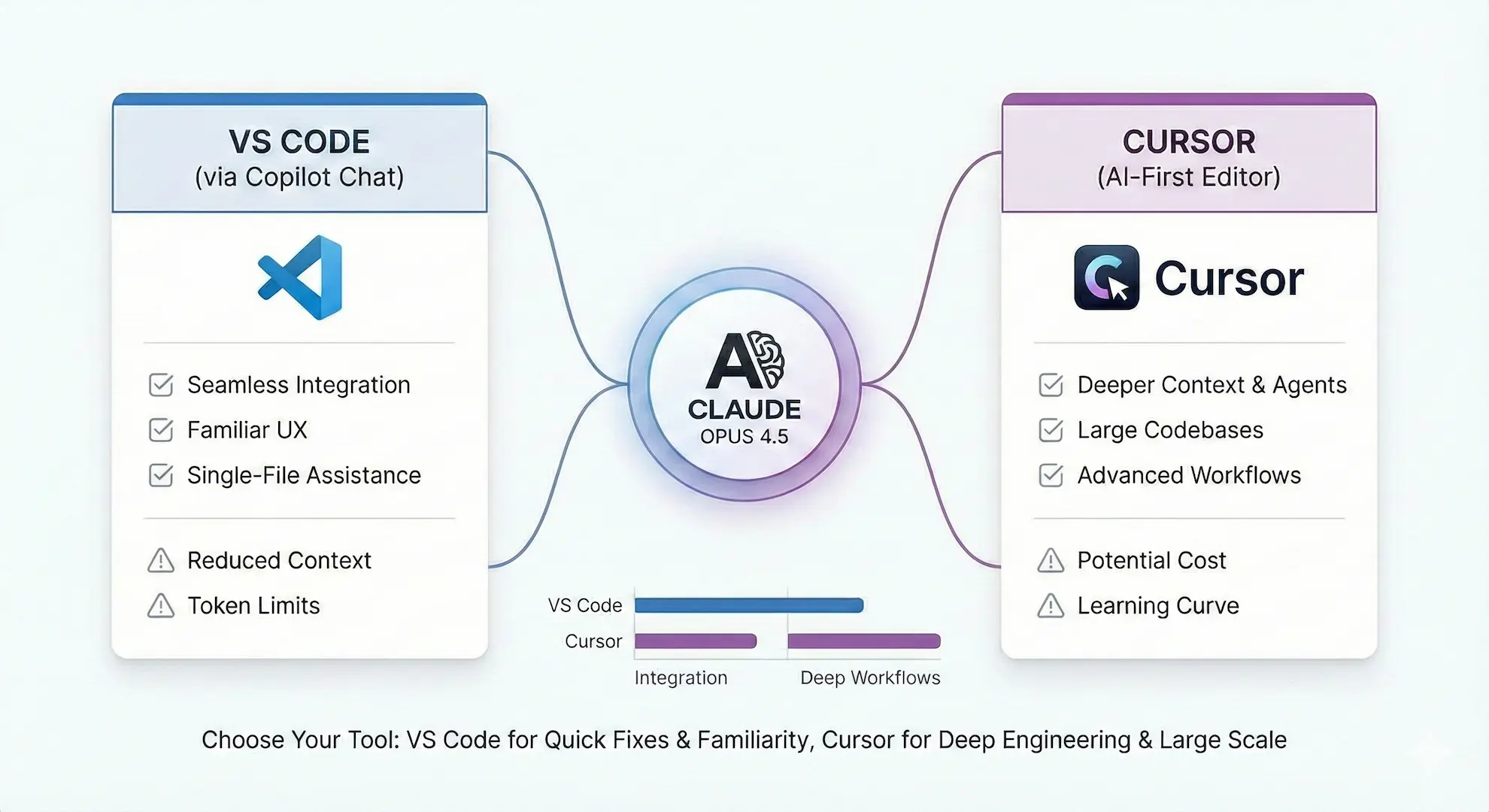
🧠 Opus 4.5 in VS Code — Strengths & Considerations
VS Code users most often access Opus 4.5 via GitHub Copilot Chat, where Anthropic has added the model to the picker alongside other model options. (Visual Studio Magazine)
⭐ Pros
1. Seamless IDE Integration
Opus 4.5 (via Copilot Chat) fits into the VS Code workflow many developers already use. Intuitive prompts and contextual suggestions show up alongside your code without switching tools. (Visual Studio Magazine)
2. Familiar UX for Developers
VS Code’s interface is familiar to millions of developers; adding Opus 4.5 here means less context switching and faster adoption. (Visual Studio Magazine)
3. Great for Single-File Assistance
For smaller tasks like fixing bugs or generating functions, Opus 4.5 does well even with relatively limited context windows inside Copilot. (Reddit)
⚠️ Cons
1. Reduced Context Depth
Some developers report that Opus 4.5 in VS Code (Copilot) sometimes feels weaker compared to Cursor — especially on deeper, multi-file codebases or architecturally complex tasks. (Reddit)
2. Token & Cost Limits
Copilot’s integration may enforce tighter usage quotas compared with a dedicated AI editor like Cursor, especially under Pro plans.
👉 Community sentiment on Reddit suggests that Copilot’s Opus 4.5 implementation may not leverage the full thinking capabilities of the model the way users expect. (Reddit)
🚀 Opus 4.5 in Cursor — Strengths & Considerations
Cursor is a standalone, AI-focused coding editor designed from the ground up to use powerful models like Claude Opus 4.5. It’s built with agent workflows and large-context coding in mind.
⭐ Pros
1. Deeper Context & Multi-Agent Workflows
Cursor users often highlight that Opus 4.5 feels stronger here, especially when it has access to broader project context or when used alongside multiple AI agents simultaneously. (Reddit)
2. Ideal for Large Codebases
Cursor’s environment is optimized for entire repositories — letting Opus 4.5 process macro-level tasks like refactors across many files, architectural planning, and deep debugging.
3. Cost Improvements & Efficiency
Recent updates have made Opus 4.5 cheaper and more efficient in Cursor compared to older versions like Opus 4.1.
⚠️ Cons
1. Cost Can Still Add Up
Despite the efficiency gains, heavy usage of Opus 4.5 in Cursor (especially for multi-agent workflows) can become expensive compared with lighter models — particularly for large teams. (Cursor – Community Forum)
2. Learning Curve
Some developers note that Cursor’s multi-agent agent workflows require learning new patterns compared to VS Code’s simpler Copilot chat prompt model.
👉 A Reddit discussion even suggests the impression that the same Opus 4.5 model feels “more powerful” in Cursor than in standard Claude apps, possibly due to how Cursor exposes context and workflow features. (Reddit)
🆚 Head-to-Head: VS Code vs. Cursor With Opus 4.5
| Feature | VS Code (Copilot + Opus 4.5) | Cursor (Opus 4.5) |
|---|---|---|
| Integration simplicity | ⭐⭐⭐⭐ | ⭐⭐⭐ |
| Deep project understanding | ⭐⭐ | ⭐⭐⭐⭐ |
| Multi-agent workflows | ⭐⭐ | ⭐⭐⭐⭐ |
| Cost efficiency (small tasks) | ⭐⭐⭐ | ⭐⭐ |
| Cost efficiency (large workflows) | ⭐⭐ | ⭐⭐ (but better than before) |
| User learning curve | ⭐⭐⭐⭐⭐ | ⭐⭐⭐ |
Overall:
- VS Code is excellent for quick assistance, UI familiarity, and single file tasks.
- Cursor excels at deeper workflows, multi-file refactors, and advanced coding assistance.
📌 Final Takeaways
- Opus 4.5 is a massive step forward in AI coding models, delivering improved reasoning, context awareness, and efficiency.
- In VS Code, Opus 4.5 integrates nicely for everyday coding support, but may not always tap into its full depth due to UI and context limits.
- In Cursor, Opus 4.5 shines more — especially on larger codebases and when using agent-based workflows.
- Ultimately, your choice depends on workflow complexity, project scale, and cost preferences.
💡 Want a quick recommendation? For solo developers or small fixes, VS Code with Opus 4.5 is a great fit. If you’re optimizing deep engineering workflows, learning team practices, or running large-scale refactors, Cursor’s advanced environment makes Opus 4.5 more powerful and effective.